Solid state drives do not store data the way spinning hard drives do, and that difference matters when a laptop, desktop or server reaches the end of its service life. A wiping routine that works well on an older hard drive may leave recoverable copies on an SSD. SSD data destruction therefore starts with understanding how the drive manages its memory, then choosing a method your organization can defend and document.
This guide explains what makes SSDs different, which options businesses commonly use, how the current NIST media sanitization guidance frames the decision, and what to prepare before handing drives to a recycling or IT asset disposition provider.

Why SSDs Need Different Handling Than Hard Drives
A hard drive writes data to physical locations on a spinning platter, and overwriting software can target those locations directly. An SSD adds a layer between the operating system and the flash memory. This layer, often called the flash translation layer, decides where data is physically stored, spreads writes across memory cells to extend the drive’s life, and keeps spare capacity the computer cannot see.
Researchers at UC San Diego examined this problem in a 2011 USENIX FAST paper, Reliably Erasing Data From Flash-Based Solid State Drives. They found that the translation layer can leave copies of data that are invisible to the user, that software techniques for sanitizing individual files were not effective in their tests, and that full-disk software overwriting worked most, but not all, of the time. Their conclusion was that reliable SSD sanitization depends on built-in, verifiable sanitize operations.
For a business, the practical takeaway is simple: deleting files, formatting a drive or running a generic overwrite tool should not be treated as SSD data destruction on its own.
What the Current NIST Guidance Says
NIST published SP 800-88 Revision 2, Guidelines for Media Sanitization, on September 26, 2025. It supersedes Revision 1 from 2014, so policies and vendor documents that still cite the 2014 version may be due for review.
Revision 2 shifts the focus from device-by-device technique tables to establishing an organization-wide media sanitization program. According to NIST’s announcement, technique and tool details were replaced with recommendations to follow IEEE 2883, NSA specifications or an organizationally approved standard. Cryptographic erase is the exception and remains described in the guide, with expanded guidance on the types of keys that may be used and on sanitizing the keys themselves. The revision also adds guidance on establishing trust in a vendor’s implementation of clear and purge methods.
In other words, the current guidance expects your organization to decide which methods are acceptable for which media and sensitivity levels, rather than relying on a single universal recipe for SSD data destruction.
Common SSD Data Destruction Options
Most SSD data destruction programs draw on three broad approaches. Which one fits depends on whether the drive will be reused, whether it still works, and how sensitive the stored information is.
Built-In Sanitize Commands
Many SSDs include firmware commands designed to sanitize the entire drive, including areas the operating system cannot address. When the manufacturer has implemented them correctly, these commands can reach memory that ordinary overwriting misses. Because results depend on the implementation, your program should define how the command is run and how the outcome is verified.
Cryptographic Erase
Drives that encrypt everything they store can be sanitized by securely destroying the encryption key, which leaves the remaining data unreadable. This approach is fast and allows the drive to be reused. It is only as strong as the encryption and key management behind it, which is why NIST’s revised guidance gives cryptographic erase specific attention.
Physical Destruction
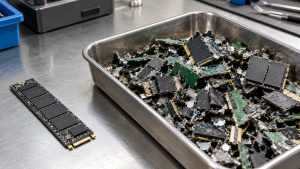
Shredding or otherwise destroying the drive is common when equipment will not be reused, when a drive has failed and cannot run a sanitize command, or when an organization’s policy requires destruction for certain data. Physical SSD data destruction ends any reuse value, so it is usually reserved for drives where that trade-off is acceptable.
For a side-by-side comparison of wiping and shredding across drive types, see Data Wiping vs Hard Drive Shredding: A Business Guide.
How to Choose a Method for Each Drive
Rather than picking one method for every device, many organizations sort drives using a few questions:
- Will the device be reused or resold? If yes, a sanitize command or cryptographic erase preserves the hardware. If not, physical destruction may be simpler.
- Does the drive still work? A failed SSD usually cannot run firmware commands, so destruction is often the remaining route.
- Was the drive encrypted, and who controlled the keys? Cryptographic erase depends on knowing that encryption was active and that the keys can be destroyed.
- What information did it hold? Customer records, health information or financial data may fall under internal policies or contracts that specify a method.
- Can the result be documented? Whatever method you choose, you should be able to tie each drive’s serial number to what was done to it.
If your team also manages traditional hard drives, How to Dispose of Old Hard Drives: A Data Security Guide covers the HDD side of the same decision.
Preparing SSDs Before They Leave Your Office
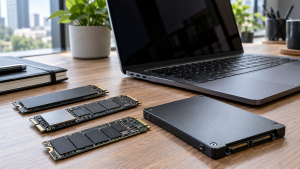
Good preparation reduces the chance that a drive is missed or handled the wrong way during SSD data destruction.
- Build an inventory. Record each device, its asset tag and the drive serial number where possible. Include servers, desktops, laptops and loose spare drives.
- Find the less obvious storage. Some laptops have storage mounted directly on the main board, and some devices contain more than one drive. Note these so they are not treated as drive-free equipment.
- Separate failed drives. Keep non-working SSDs in their own group, since they will likely need a different method.
- Back up what you need. Confirm that any business data you must retain has been copied before sanitization begins.
- Agree on methods in writing. Decide which drives will be sanitized for reuse and which will be destroyed, and share that list with your provider before pickup.
If computers will be wiped internally before collection, How to Wipe a Computer Before Recycling walks through the preparation steps and their limits.
Documentation to Request
A record of SSD data destruction is often as important as the work itself. Ask for documentation that identifies each drive by serial number, states the method used, shows when the work happened and names who performed it. A pickup receipt or recycling record is not the same as a data destruction record. Certificate of Data Destruction: A Business Guide explains what a useful certificate should contain and how to reconcile it with your inventory.
How 3W Computer Handles SSD Data Destruction
3W Computer works with businesses retiring IT equipment, including drives that need secure handling. On its website, 3W Computer lists on-site HDD and SSD shredding, physical hard drive shredding, software wiping and a certificate of destruction as part of its data destruction services, along with logistics and pickup for IT asset disposition projects.
If you are planning a retirement project, it helps to share your drive inventory, how many SSDs are working or failed, and which drives must be destroyed rather than reused. 3W Computer can then discuss which options fit your equipment and documentation needs. For servers with multiple drives, Server Recycling: Retire Old Servers and Protect Data covers additional planning steps.
Frequently Asked Questions
Is formatting an SSD enough before recycling it?
No. Formatting changes how the operating system sees the drive but does not reliably remove data from every memory area an SSD manages internally, so it should not be treated as SSD data destruction.
Can an SSD be reused after sanitization?
Often, yes. Built-in sanitize commands and cryptographic erase are designed to leave the drive usable. Physical destruction ends reuse.
What happens if an SSD has failed?
A failed drive usually cannot run firmware commands or cryptographic erase, so physical destruction is the common route. Keep failed drives listed separately in your inventory.
Does the current NIST guidance still list specific SSD techniques?
SP 800-88 Revision 2 replaced most technique details with recommendations to follow IEEE 2883, NSA specifications or an organizationally approved standard. Cryptographic erase remains covered in the guide.
Is SSD data destruction different for laptops and servers?
The principles are the same, but servers often hold many drives and laptops may have storage built onto the main board. Both should be inventoried drive by drive.
Plan SSD Data Destruction Before the Equipment Moves
SSDs reward a deliberate approach: know which drives you have, decide which will be reused or destroyed, and keep records that match each serial number. Treating SSD data destruction as a planned step, rather than a last-minute wipe, makes the rest of your IT retirement project easier to manage.
To discuss SSD data destruction for retired laptops, desktops or servers, contact 3W Computer and share your drive inventory and documentation requirements.
Sources
- National Institute of Standards and Technology, SP 800-88 Rev. 2: Guidelines for Media Sanitization (September 2025)
- NIST, Guidelines for Media Sanitization: NIST Publishes SP 800-88r2
- Wei, Grupp, Spada and Swanson, Reliably Erasing Data From Flash-Based Solid State Drives, USENIX FAST (2011)
Name: Win Win World Recycle LLC
Address: 1226 West 9th Street, Upland, CA 91786
Phone: 908-798-6789