

A laptop that will not turn on can still contain personal files or business records. A cracked screen, failed charging port, or damaged motherboard does not establish that its storage has been erased.
If you are researching how to recycle a broken laptop, start with three decisions: whether you need any files recovered, how the storage will be handled, and whether the battery requires special attention. Then confirm that your chosen provider accepts the device in its actual condition.
The practical goal is to hand over the right equipment with clear instructions. This guide covers individual laptops and small business batches, including machines that cannot complete a normal reset.
Can You Recycle a Laptop That Does Not Work?
Yes, nonworking laptops can often enter electronics recycling programs. Acceptance depends on the program, the device’s condition, and any battery damage. Confirm those details before visiting a collection location or arranging transport.
Describe the problem specifically. “Broken” could mean a cracked display, missing charger, liquid damage, or a swollen battery. Those conditions raise different questions for the receiving provider.
Recycling also does not necessarily mean every part immediately becomes scrap. Ask whether a device can be assessed for repair, usable parts, or material recovery after its data requirements have been addressed. Do not assume a broken laptop has resale value or that every component can be reused.
EPA recommends considering an upgrade before replacing a computer and removing personal information before donation or recycling. For a machine that has already failed, an assessment can help you decide whether further repair makes practical sense. Source: EPA electronics donation and recycling.
First, Describe the Condition Without Dismantling the Laptop
Gather information that you already know or can observe safely. You do not need to diagnose every failed component to request recycling information.
| What you know | What to tell the provider |
|---|---|
| The laptop does not turn on | Whether it previously worked and whether files are still needed |
| The display is cracked | Whether the case is also damaged and whether the laptop still starts |
| Liquid was spilled on it | The known damage and whether it has been assessed |
| The case or trackpad appears lifted | That battery swelling may be present |
| Storage was previously removed | Who removed it and where the storage is now |
| Several company laptops are involved | Quantity, models if available, location, and data requirements |
Do not power on a visibly damaged device just to produce a better description. If you are uncertain, say “condition unknown” rather than guessing.
For business equipment, check ownership before arranging disposal. A leased machine, a device assigned to an employee, or equipment held for an investigation may require internal approval before it leaves your organization.
Decide Whether You Need Files Recovered Before Recycling
Recycling and file recovery have different goals. If the laptop contains the only copy of important photos, financial documents, or work files, resolve that issue before authorizing storage destruction.
Check your existing backups from another authorized device. For a business laptop, involve IT so you can distinguish files stored locally from files already held in approved cloud or server systems.
A dead laptop does not establish that file recovery is impossible. It also does not guarantee that recovery will succeed. Ask a qualified technician to assess recovery options if needed, and agree on the scope and cost before work begins.
Write the decision clearly: “Files recovered; disposal authorized,” “No recovery required,” or “Hold for recovery assessment.” A device awaiting recovery should not be mixed into a batch approved for destruction.
How to Recycle a Broken Laptop When You Cannot Wipe It
When the laptop cannot run, its usual reset procedure may be unavailable. Treat the storage as containing data until its handling has been resolved.
NIST SP 800-88 Revision 2 describes media sanitization as making access to target data infeasible for a specified level of effort. Its guidance addresses selecting methods for the media and the sensitivity of the information. A failed screen or motherboard is not evidence that such a process has occurred. Source: NIST SP 800-88 Revision 2.
Ask your IT team or prospective provider:
- Can the storage be accessed independently of the failed laptop?
- What approach is appropriate for this storage type and condition?
- What happens if the proposed sanitization process cannot complete?
- Who authorizes physical destruction when required?
- What evidence of the completed work will be supplied?
Avoid treating a promise to “recycle the laptop” as an answer to those questions. Agree on the data handling separately, before transfer.
If encryption was enabled, share that information with your authorized IT team. Do not assume encryption alone closes the disposal task; key management, device history, and the selected sanitization approach still need review.
Should You Remove the Hard Drive or SSD Yourself?
Removal is not a universal requirement. Some laptops have storage that a trained technician can remove; others require more involved work. Check the model’s service information and your organization’s policy before opening the case.
If you are unfamiliar with the device, ask for professional handling. Battery damage is an additional reason to avoid disassembly.
Keeping a removed drive also creates a separate responsibility. Record where it is stored and arrange its eventual disposition. Otherwise, you may recycle the laptop while leaving its data unresolved in a drawer.
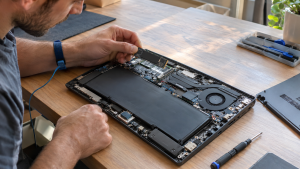
Report a Swollen or Damaged Battery Before Handover
A laptop with a suspected swollen battery needs an explicit handling discussion. Do not put it into an ordinary equipment batch without informing the receiving provider.
Stop using the affected device and obtain guidance from the manufacturer or a qualified professional. Do not press on, puncture, bend, or force out a swollen battery. Manufacturer guidance warns against damaging or trying to free a battery that has become stuck through swelling. Source: manufacturer guidance on swollen lithium-ion batteries.
EPA advises keeping lithium-ion batteries out of household garbage and municipal recycling bins. It also notes that some batteries are not user serviceable and recommends contacting the manufacturer for damaged-battery handling information. Source: EPA used household batteries.
Before transport, tell the provider what you have observed and ask whether it accepts that condition. Obtain its packing and transport instructions. Do not assume an ordinary mail-in program accepts a damaged battery.
Confirm Acceptance, Fees, and Collection Options
Before leaving home or preparing a business batch, confirm the arrangement directly. An address on a website does not by itself establish walk-in access or drop-off hours.
Useful questions include:
- Do you accept nonworking laptops in this condition?
- Can the battery remain installed?
- Do you accept chargers and accessories with the laptop?
- Are recycling and data handling charged separately?
- Is there a minimum quantity for collection?
- Does the quoted arrangement include packing or loading?
- What record will I receive at handover?
There is no universal price for recycling a broken laptop. Device condition, data work, collection requirements, and the receiving program can affect the total. Ask for a clear explanation of any charges before agreeing.
If a provider offers a purchase assessment, confirm whether payment is actually offered for your device. Recycling acceptance and a purchase offer are separate decisions.
Prepare a Business Batch Without Losing Track of Storage
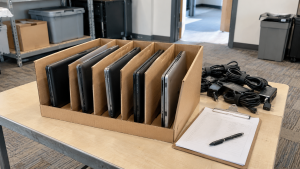
For several broken company laptops, use a short inventory. Record the asset identifier, reported condition, storage status, recovery decision, and authorized disposition.
For example, five laptops with broken screens and one with suspected battery swelling should not be described simply as “six old laptops.” Flag the battery condition separately and get instructions before packing.
Use only the packing method agreed with the provider. Keep devices awaiting recovery or internal approval out of the collection. Remove loose personal accessories when safe, and keep any retained storage in an access-controlled location.
At handover, compare the equipment with the list and note exceptions. Afterward, reconcile the received records with your internal inventory. An equipment receipt records a transfer; it should not be treated as proof of completed data sanitization unless it actually documents that work.
Frequently Asked Questions
Can I recycle a laptop with a cracked screen?
Often, yes. Confirm acceptance and disclose any additional case or battery damage. A cracked display does not establish that stored files have been erased.
Is my data gone if the laptop will not turn on?
Do not assume so. The problem preventing startup may be separate from the storage. Resolve recovery and sanitization requirements before handing it over.
Do I have to repair the laptop before recycling it?
Usually, the first step is to ask whether the program accepts it as it is. Repair may be worth assessing if you need files recovered or want to evaluate continued use, but do not incur repair costs solely on an assumption about recycling acceptance.
Can I recycle the laptop after removing its drive?
Check with the provider. Tell it that the drive is missing, and keep a separate record of the retained drive’s location and eventual disposition.
Can a laptop with a swollen battery go in the same box as other laptops?
Do not pack it with ordinary equipment before obtaining condition-specific instructions. Disclose the suspected swelling and confirm acceptance and transport arrangements.
Will I receive cash for a broken laptop?
That depends on an actual purchase assessment. No payment should be assumed. Confirm any offer, deductions, and conditions before agreeing to transfer ownership.
Discuss Your Broken Laptop With 3W Computer
Understanding how to recycle a broken laptop starts with its condition, the files you need, and the unresolved storage and battery questions. Settle those points before arranging disposal.
Contact 3W Computer with the quantity, models if known, location, reported faults, and whether data recovery or storage handling remains unresolved. Mention suspected battery damage at the start. Ask about acceptance, available data handling, fees, and collection or drop-off arrangements for your equipment before transport.
Name: Win Win World Recycle LLC
Address: 1226 West 9th Street, Upland, CA 91786
Phone: 908-798-6789